
- Translator
- Binary translator
Binary translator
Convert text to binary or read binary as text with UTF-8 bytes or seven-bit ASCII groups. Choose the encoding explicitly, keep or remove group spaces, and use the separate number mode for decimal values.
Translate text and binary
Everything you enter stays in your browser; the converter sends no input over the network.
Enable JavaScript to use the converter. You can still read the examples and reference table below without it.
Enter text. UTF-8 supports accents, other scripts, and emoji.
Up to 1200 Unicode code points when encoding; a visible symbol can count as more than one. Decoding accepts 4800 groups and 50000 input characters including whitespace.
Select the result to copy it, or use Copy result.
Text modes preserve spaces and line breaks in the message. Number modes accept nonnegative whole numbers: up to 1000 decimal digits or 4096 binary digits. No image recognition or encoding detection.
How do you translate binary to text?
Choose Binary to text, select the encoding, and paste your zeros and ones. For a first check, use 01001000 01101001 with UTF-8 selected, then press Convert. The result is Hi. The ASCII table assigns H the value 72 and i the value 105; those values are unchanged in UTF-8 (RFC 20, section 2); (RFC 3629, section 1).
- Keep the default UTF-8 setting for eight-bit text bytes.
- Choose 7-bit ASCII only when your source uses seven bits per character.
- Press Convert and read the status message before copying the result.
You can paste one continuous run or put spaces, tabs, and line breaks between complete groups. A continuous run must divide evenly into the selected width. This tool checks each whitespace-separated run too, so a missing digit cannot quietly borrow one from the next group. It accepts only 0, 1, and whitespace in this mode.
Should I choose UTF-8 or ASCII?
ASCII is a seven-bit character set with 128 possible values, including control codes and printable characters (Unicode glossary, ASCII). This converter writes exactly seven bits in ASCII mode. RFC 20 also describes placing that seven-bit value inside an eight-bit byte with a leading zero (RFC 20, opening paragraph). That is why you may see both widths used for the same letter.
UTF-8 uses one to four bytes for a Unicode character. Its ASCII characters use one byte, while characters outside that range need longer sequences (RFC 3629, section 3). The Unicode FAQ independently confirms that UTF-8 preserves ASCII values (Unicode FAQ, eight-bit formats). For example, this tool converts é to 11000011 10101001 using UTF-8. ASCII mode flags that character and asks you to change encoding.
The selection controls both encoding and decoding. Changing it does not inspect the message or detect its original format. If someone sends you a puzzle, ask which encoding and group width they used before changing settings to chase a readable answer.
How do I convert text to binary?
Choose Text to binary, enter your message, and press Convert. Leave Add spaces between output groups checked while learning: the boundaries make it easier to compare the result with the table. Uncheck it for a continuous string. Both forms decode with the same encoding selected.
The translator preserves letter case, punctuation, spaces, and line breaks in your text. A space inside a message therefore needs its own encoded value; the optional spaces between binary groups are only visual separators. In ASCII, the space character has decimal value 32, and the digit character 1 has value 49 (RFC 20, section 2). The Basic Latin chart cross-checks those characters at hexadecimal positions 0020 and 0031, and A at 0041 (Unicode Basic Latin chart).
| Text character | Decimal value | 7-bit ASCII | UTF-8 byte |
|---|---|---|---|
| A | 65 | 1000001 | 01000001 |
| H | 72 | 1001000 | 01001000 |
| i | 105 | 1101001 | 01101001 |
| Space | 32 | 0100000 | 00100000 |
| 1 | 49 | 0110001 | 00110001 |
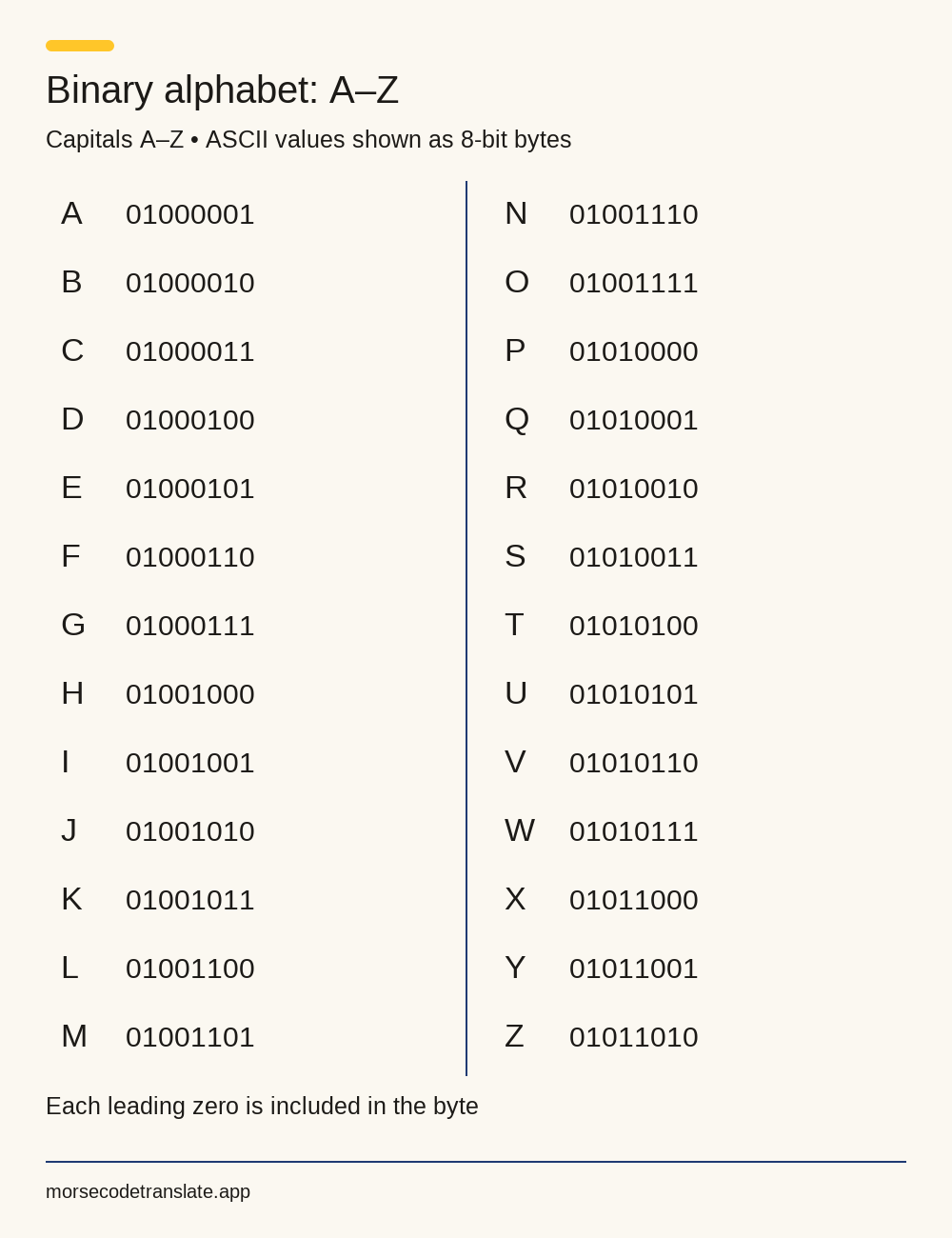
Open the chart to print or save it
Try a short message first. Copy its result into Binary to text with the same encoding and confirm that you get the original message back. The text encoder allows 1,200 Unicode code points; a combined symbol can count as more than one. The binary decoder allows 4,800 complete groups and 50,000 input characters including whitespace.
What are bits and bytes?
A bit is one binary digit, written as 0 or 1. The seven bit positions in the ASCII standard specify a character’s numeric value (RFC 20, sections 2–3). A byte here is eight bits, following the Unicode standard’s use of byte to mean an octet (Unicode glossary, Byte). The extra leading zero in 01000001 does not change A’s numeric value.
Keep the unit labels when sharing a result. “Seven-bit ASCII groups” and “UTF-8 bytes” tell the reader how to divide the digits. “Binary” alone does not tell this tool which text representation you intended. Its decoder deliberately keeps that choice in your hands.
Why does my binary code show an error?
First check the group width. A seven-digit group needs ASCII selected; an eight-digit group needs UTF-8 selected here. Remove commas, quotation marks, and prefixes such as 0b. If you wrap a long string across lines, place the break between complete groups. The error names the first incomplete run and its bit count.
A complete eight-bit group can still be part of an invalid UTF-8 sequence. The standard requires decoders to protect against interpreting invalid sequences, including overlong encodings, as characters (RFC 3629, sections 3–4). This tool reports that problem instead of silently substituting replacement characters or guessing another encoding. It does not support Latin-1, UTF-16, image recognition, or automatic recovery of missing digits.
The status message warns about some control characters that may be invisible; it does not flag every invisible character. Copy result uses the decoded values; selecting the displayed text manually may normalize line endings. Editing the input or changing a setting clears the previous result, so convert again before copying your revised message.
How do binary numbers convert to decimal?
Use the two number options for a numeric value rather than a text message. Try decimal 42: the binary result is 101010. Change direction and convert that result back to decimal. Number mode treats all the digits as one value and ignores whitespace in binary input.
This is different from typing 42 in Text to binary. That setting encodes the separate characters 4 and 2; their ASCII values are 52 and 50 (RFC 20, section 2). A short string of bits is not automatically a letter.
The number converter accepts nonnegative whole numbers only, with no decimal points, signs, prefixes, or exponent notation. It handles up to 1,000 decimal digits or 4,096 binary digits with exact integer arithmetic.
Can a binary translator send Morse code?
You can send the written binary digits as Morse characters. This example first encodes A as the UTF-8 byte 01000001, then sends those eight digits using the Morse patterns for 0 and 1. The numeric Morse patterns are defined in the international standard (ITU-R M.1677-1, section 1.1.2). Press Listen or Flash to follow the digits in order.
The listener must recover the digits and then decode the byte to get A. To send the letter directly, use the Morse translator. Check individual digits in Morse code numbers and letters in the Morse code alphabet.
Morse is not strictly a two-symbol text representation just because its marks are short or long: it also needs meaningful gaps. A dash lasts three dots, and the gaps within a letter, between letters, and between words last one, three, and seven dots (ITU-R M.1677-1, section 2). A timed on/off recording can preserve those distinctions as bits. Replacing each short or long mark with a digit while dropping the gaps loses information. See Morse code vs binary and the timing rules, or start learning Morse by ear.
Sources
- RFC 20: ASCII format for Network Interchange, V. G. Cerf. RFC Editor, IETF, 16 October 1969.
- RFC 3629: UTF-8, a transformation format of ISO 10646. RFC Editor, IETF, November 2003; checked 11 November 2026.
- UTF-8, UTF-16, UTF-32 & BOM FAQ. Unicode Consortium, checked 11 November 2026.
- C0 Controls and Basic Latin, U+0000–U+007F. Unicode Consortium, checked 11 November 2026.
- Glossary of Unicode Terms: ASCII and Byte. Unicode Consortium, checked 11 November 2026.
- Recommendation ITU-R M.1677-1, International Morse code. ITU Radiocommunication Sector, October 2009.