
- Translator
- Braille translator
Braille translator
Translate English text to Unicode braille, or decode braille cells and dot numbers back to text. This tool uses a limited set of Unified English Braille (UEB) grade 1 rules, without grade 2 contractions.
Translate text and braille
Everything you type stays in your browser; the translator sends no text over the network.
Enable JavaScript to use the translator. You can still read the reference table and cell example below.
Enter English letters, digits, and the punctuation listed below.
Up to 600 input characters. Grade 1 only; Grade 2 contractions are not supported.
Select the result to copy it, or use Copy result.
Dot numbers:
Cells and raised dots
How to translate text to braille
Start with a short phrase, such as Cat 12. The text to braille converter keeps English letters and their capitalization, adds number indicators, and converts the supported punctuation. It accepts up to 600 input characters. Start with one word if you want to inspect each pattern before copying a longer result.
- Choose the text-to-braille direction and enter your text.
- Press Convert, then read the output and any notes about unsupported input.
- Check the cell diagrams, then use Copy result to copy the output.
The output for Cat 12. is ⠠⠉⠁⠞ ⠼⠁⠃⠲. Notice that the output has more cells than the word has letters: indicators are part of the result. Keep them when you copy it. In text-to-braille mode, this tool also collapses repeated spaces and line breaks into single spaces, so it does not preserve a document’s layout.
What do the dots in each cell mean?
A six-dot braille cell has two columns of three positions. Number the left column 1, 2, 3 from top to bottom and the right column 4, 5, 6. Braille is a tactile writing system: its raised dots are read by touch (BANA, page 1).
The diagrams below show which positions are raised for cat. Their text labels name the positions too. Use those labels if you cannot distinguish the dot shapes on your screen. Follow one cell at a time, then compare the complete word.
⠉⠁⠞
- Letter cRaised dots 1, 4
- Letter aRaised dots 1
- Letter tRaised dots 2, 3, 4, 5
The reference uses lowercase alphabet patterns. Capital and numeric indicators change how following cells are read; they are separate entries. The alphabet and punctuation come from the official UEB tables (ICEB, sections 4 and 7); the indicators are covered in (ICEB, sections 5, 6, and 8).
| Text or function | Unicode cells | Raised dots per cell |
|---|---|---|
| a | ⠁ | 1 |
| b | ⠃ | 1-2 |
| c | ⠉ | 1-4 |
| d | ⠙ | 1-4-5 |
| e | ⠑ | 1-5 |
| f | ⠋ | 1-2-4 |
| g | ⠛ | 1-2-4-5 |
| h | ⠓ | 1-2-5 |
| i | ⠊ | 2-4 |
| j | ⠚ | 2-4-5 |
| k | ⠅ | 1-3 |
| l | ⠇ | 1-2-3 |
| m | ⠍ | 1-3-4 |
| n | ⠝ | 1-3-4-5 |
| o | ⠕ | 1-3-5 |
| p | ⠏ | 1-2-3-4 |
| q | ⠟ | 1-2-3-4-5 |
| r | ⠗ | 1-2-3-5 |
| s | ⠎ | 2-3-4 |
| t | ⠞ | 2-3-4-5 |
| u | ⠥ | 1-3-6 |
| v | ⠧ | 1-2-3-6 |
| w | ⠺ | 2-4-5-6 |
| x | ⠭ | 1-3-4-6 |
| y | ⠽ | 1-3-4-5-6 |
| z | ⠵ | 1-3-5-6 |
| , | ⠂ | 2 |
| ; | ⠆ | 2-3 |
| : | ⠒ | 2-5 |
| . | ⠲ | 2-5-6 |
| ! | ⠖ | 2-3-5 |
| ? | ⠦ | 2-3-6 |
| ' | ⠄ | 3 |
| - | ⠤ | 3-6 |
| ( | ⠐⠣ | 5 then 1-2-6 |
| ) | ⠐⠜ | 5 then 3-4-5 |
| number indicator | ⠼ | 3-4-5-6 |
| capital indicator | ⠠ | 6 |
| grade1 indicator | ⠰ | 5-6 |
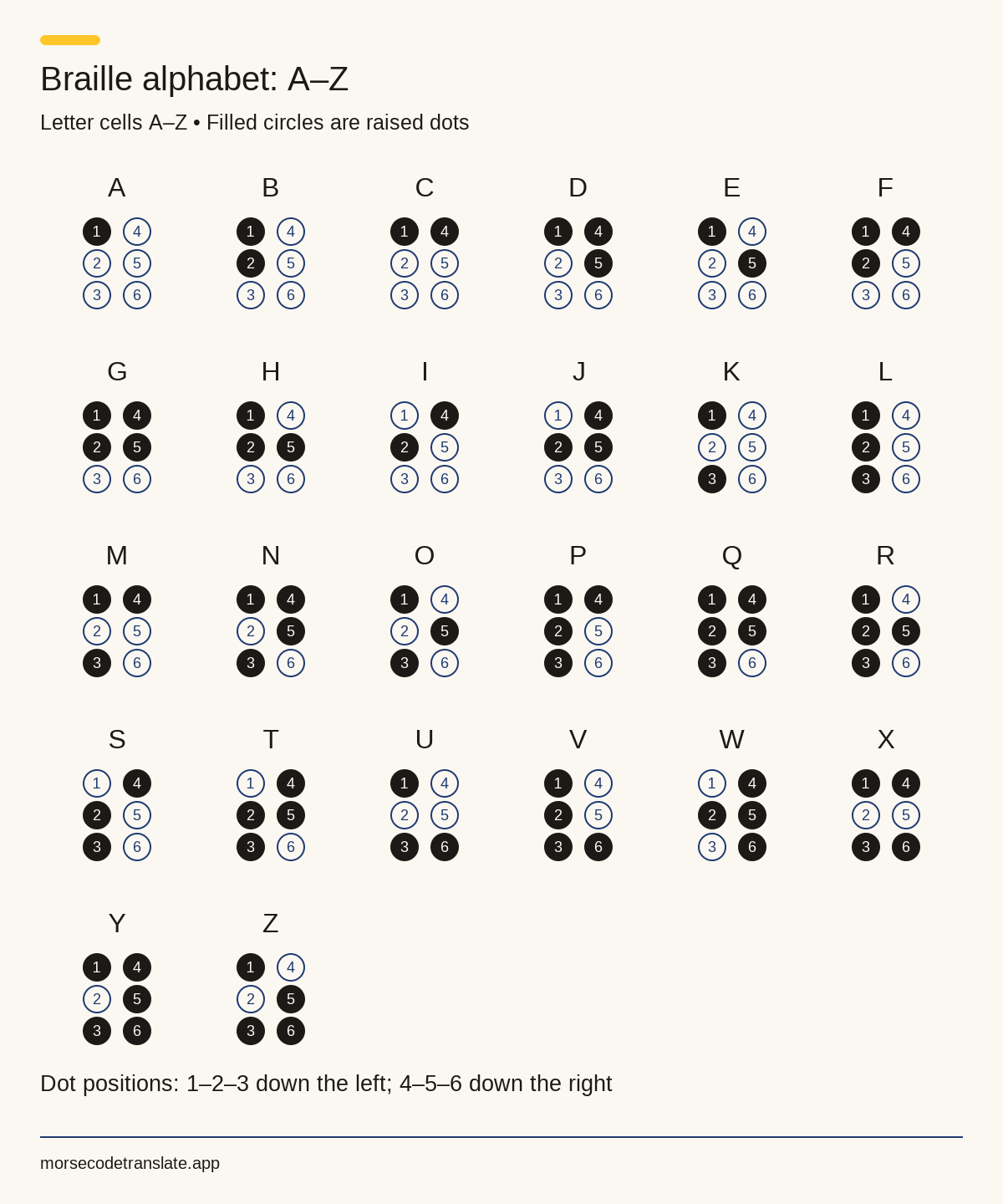
Open the chart to print or save it
How to translate braille back to English
Switch to the braille-to-text direction and paste Unicode braille. Include the complete message, especially its capital and numeric indicators. The decoder uses the same limited uncontracted rules as the encoder. It reads ordinary spaces and the Unicode blank braille cell as word spaces.
You can also enter dot numbers. Write 1-2-5 or 125 for one cell, put spaces between cells, and use / between words. To enter cat, try 1-4 1 2-3-4-5. The slash here separates words in this tool’s input format; it does not represent a braille punctuation cell.
If a result is unexpected, check the input direction first. Then check whether you kept every indicator and separated dot-number cells correctly. A group such as 125 means one pattern with three raised positions, rather than three consecutive cells. Do not insert spaces between individual Unicode cells unless you intend word spaces.
Why are there extra cells before capitals and numbers?
The capital letter indicator is dot 6. Two dot-6 cells introduce a capitalized letter sequence. This converter uses those forms and a capital terminator when lowercase letters follow an uppercase run (ICEB, sections 8.3–8.6).
Digits 1 through 9 and 0 use the patterns for a through j after the numeric indicator, dots 3-4-5-6 (BANA, guideline 3). For example, 12 becomes ⠼⠁⠃.
Numeric mode continues through commas and periods. A space or hyphen ends it. Within numeric mode, lowercase a–j immediately after a digit, comma, or period need a grade 1 indicator, dots 5-6, to prevent a numeric reading (ICEB, sections 6.2–6.5). Compare 3b: ⠼⠉⠰⠃.
Supported punctuation includes the comma, semicolon, colon, period, exclamation mark, question mark, apostrophe, hyphen, and parentheses. Parentheses use two cells each (ICEB, section 7). A question mark standing alone, or after a space or hyphen, needs a grade 1 indicator to distinguish it from a wordsign or an opening quotation mark (ICEB, section 7.5). Check the reference rather than assuming every printed mark takes one cell.
Can you copy and paste the braille text?
Yes. Copy produces text characters, rather than a picture of dots. Unicode assigns braille patterns to the U+2800–U+28FF block (Unicode, Braille Patterns). Try copying a short result back into this decoder before using it elsewhere, and compare the decoded text with your original phrase.
A screen image does not provide raised dots. Use the converter to inspect patterns or prepare a short example; for tactile production, arrange suitable equipment and a braille review. BANA asks for qualified proofreading and checks on final sizing and spacing for signs (BANA, Braille Translation and Proofreading).
Does this braille translator support grade 2?
No. Grade 2 contractions are not supported. Contracted braille can represent groups of letters or whole words with shortened forms (BANA, guideline 1.2). Pasting contracted text here can therefore give an incorrect reading even when some cells look familiar. The decoder does not determine the source text’s grade.
This is a limited UEB grade 1 tool, not a complete transcription system. Quotation marks, slashes, accented letters, mathematical notation, and capitalized passage indicators are outside its scope. Unsupported text characters produce a replacement mark and a note when you encode them. The decoder cannot reliably flag every unsupported meaning of a cell. Resolve any notes and check the reading against your source before using the output.
For rules beyond this subset, use the official ICEB UEB rulebook. BANA’s uncontracted and contracted braille guidance explains the distinction. Keep the source text alongside any result you ask someone to review.
See the same word in Morse code
Braille is not Morse code. The braille example above uses dot positions within cells. Morse CAT uses successive short and long signals, with timed gaps (ITU, Annex 1, sections 1–2).
- C
- A
- T
Try another word in the Morse code translator, look up its letters in the Morse code alphabet, or practice recognizing its rhythm with How to learn Morse code by ear.
For a fuller comparison, see Morse code vs braille.
Sources
- The Rules of Unified English Braille, Third Edition. International Council on English Braille, 2024; checked 11 November 2026.
- BANA Guidelines for the Creation of Braille Signage. Braille Authority of North America, October 2023; checked 11 November 2026.
- Unicode Character Code Charts: Braille Patterns, U+2800–U+28FF. Unicode Consortium, checked 11 November 2026.
- Recommendation ITU-R M.1677-1, International Morse code. ITU Radiocommunication Sector, October 2009.